SALE

Sale on all game servers · up to −19% · discount already applied, no coupons

Test servers

Try it on our servers

We keep two servers open, one in Germany and one in Miami. Join from Java or Bedrock, on whatever version you run, and see how they perform before paying for anything.

If after the trial you decide it's not for you, you pay nothing. If you keep it, billing starts the next day at the regular price.

How to upgrade your plan or add more RAM

Account, billing & free trial 4 views Updated 2 Aug 2026

If it falls short, you can upgrade anytime from your client area with the "Upgrade" button.

Is your server running low on RAM, crashing with many players, or do you want to add more mods? You can upgrade to a higher plan at any time, without losing your world or configuration.

How to upgrade

  1. Go to your services.
  2. Open the service you want to upgrade.
  3. Press the "Upgrade" button and pick the higher plan.
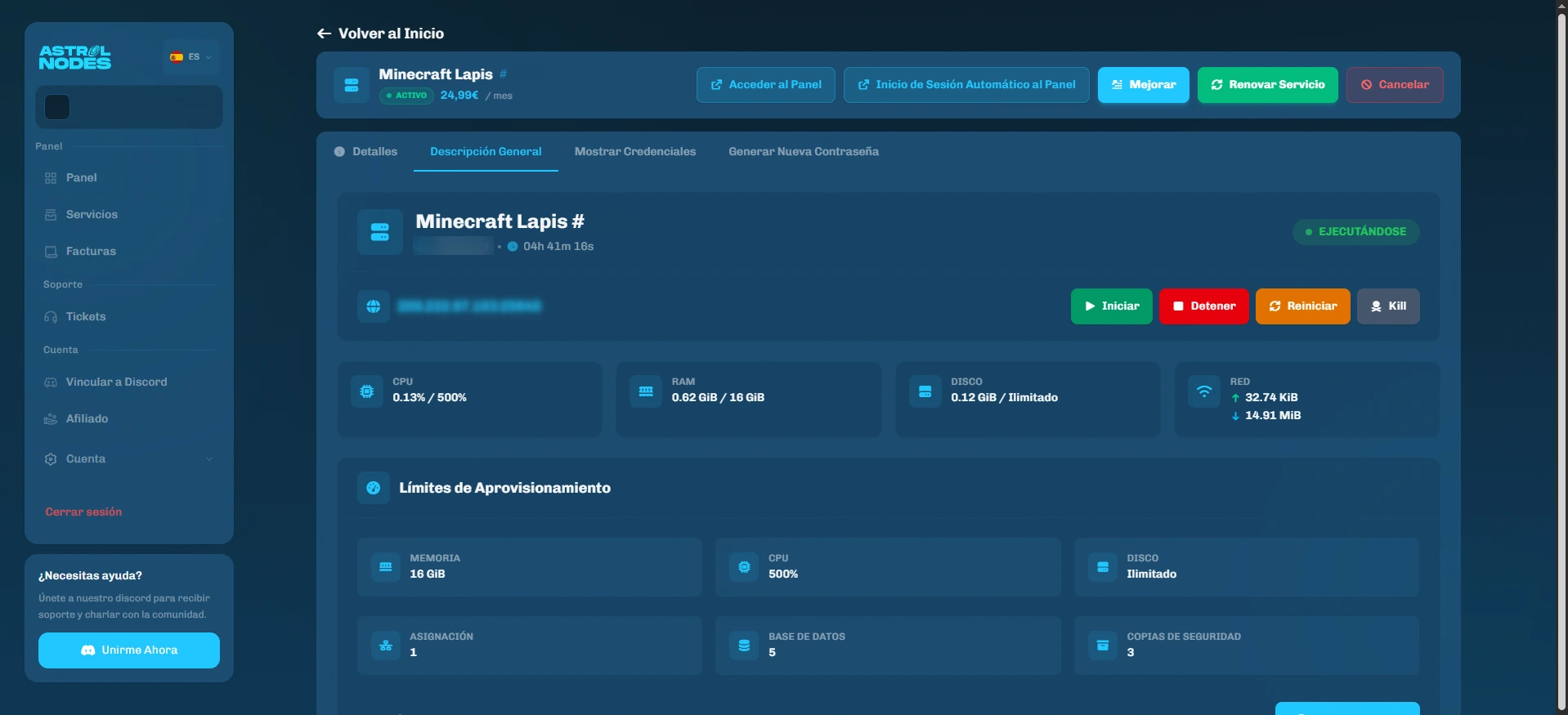
astrolnodes.net · your serviceThe service bar in the client area, with the "Upgrade" button
The service bar in the client area, with the "Upgrade" button

The change applies to the same server: you keep everything as it is.

We never charge extra for installing more mods or plugins. If you get crashes from low RAM (especially with heavy modpacks or many players), upgrading is the fix. And there's no commitment: adjust it whenever you want.

Was this article helpful?

Need more help?

Open a ticket and our team will get back to you fast.

Open a ticket