SALE

Up to −19% off all game servers · price already applied, no coupons

Menu
Free trial

Try it free for 24 hours

We keep two servers open, one in Germany and one in Miami. Join from Java or Bedrock, on whatever version you run, and see how they perform before paying for anything.

If after the trial you decide it's not for you, you pay nothing. If you keep it, billing starts the next day at the regular price.

Rust Servers with Oxide & Wipes

High-frequency Ryzen 9 · Wipes scheduled from the panel

Vanilla, Oxide or Carbon in one click, scheduled wipes and full RCON access, on high-frequency CPUs.

Instant setup Anti-DDoS included Daily backups 24/7 support
24-hour trial Try it free for 24 hours before paying
Rust Starter

Rust Starter

6 GB RAM DDR5
  • AMD Ryzen™ 9 CPU Guaranteed
  • 400% CPU (4 vCores)
  • Unlimited NVMe SSD Storage
  • DDoS Protection
  • 2 Backups
9,99€ −10%
8,99€ / month
$10,44 USD
Limited-time offer · buy it and your price never goes up
Rust Community

Rust Community

12 GB RAM DDR5
  • AMD Ryzen™ 9 CPU Guaranteed
  • 500% CPU (5 vCores)
  • Unlimited NVMe SSD Storage
  • DDoS Protection
  • 2 Backups
21,99€ −14%
18,99€ / month
$22,06 USD
Limited-time offer · buy it and your price never goes up
Rust Pro

Rust Pro

16 GB RAM DDR5
  • AMD Ryzen™ 9 CPU Guaranteed
  • 500% CPU (5 vCores)
  • Unlimited NVMe SSD Storage
  • DDoS Protection
  • 2 Backups
28,99€ −14%
24,99€ / month
$29,03 USD
Limited-time offer · buy it and your price never goes up

Prices lowered as a trial: we are testing this price drop and, if the numbers hold up, it stays for good. The price you lock in today is yours and will not go up even if the trial ends.

Before you pick a plan

What you configure and what we include

The server is complete on all four plans: no limited frameworks, no per-slot charges and no modules sold separately.

You set this up

Vanilla, Oxide/uMod or Carbon, and you switch framework on reinstall.

Map worldsize and seed, or your own custom map.

The slot count, from the startup parameters.

The wipe schedule: map, blueprints or both.

Your .cs plugins, over SFTP or from the file manager.

The commands, from the console or over RCON and WebRCON.

Already in place

Always-on anti-DDoS, at no extra cost.

Daily backups of the world, restored from the panel.

The first-Thursday build, applied on a scheduled restart.

A panel in your language, with no SSH and no command line.

Moving up a plan mid-wipe without losing the world.

24/7 support from people who actually play Rust.

Start with the plan you need today and move up when the map fills out: the world, the plugins and the configuration are kept.

See the plans
Wipes

How wipes are handled

Facepunch forces the map wipe on the first Thursday of every month. Your server applies that update on a scheduled restart and keeps a backup of the previous world.

  1. Before

    You schedule the wipe

    Choose the cadence (weekly, fortnightly or whatever you need) and what gets cleared: the map, the blueprints or both. It stays scheduled in the panel.

  2. Thursday

    The forced update arrives

    Facepunch ships the first-Thursday build and forces the map wipe. Your server applies it on a scheduled restart, with no action needed from you.

  3. The wipe

    The new map is generated

    The map is created with the configured worldsize and seed, or with the custom map you uploaded. Oxide and Carbon plugins are kept.

  4. After

    The previous world is kept

    The pre-wipe backup is stored and can be restored from the panel if you need to roll back.

Facepunch forces the blueprint wipe roughly every two months.

You run your own wipes from the panel, without opening a ticket.

See the plans
Your panel

Server administration

The same panel our own servers run on. The screenshots are real.

Tap a section to see it

gamedash.astrolnodes.net Online now
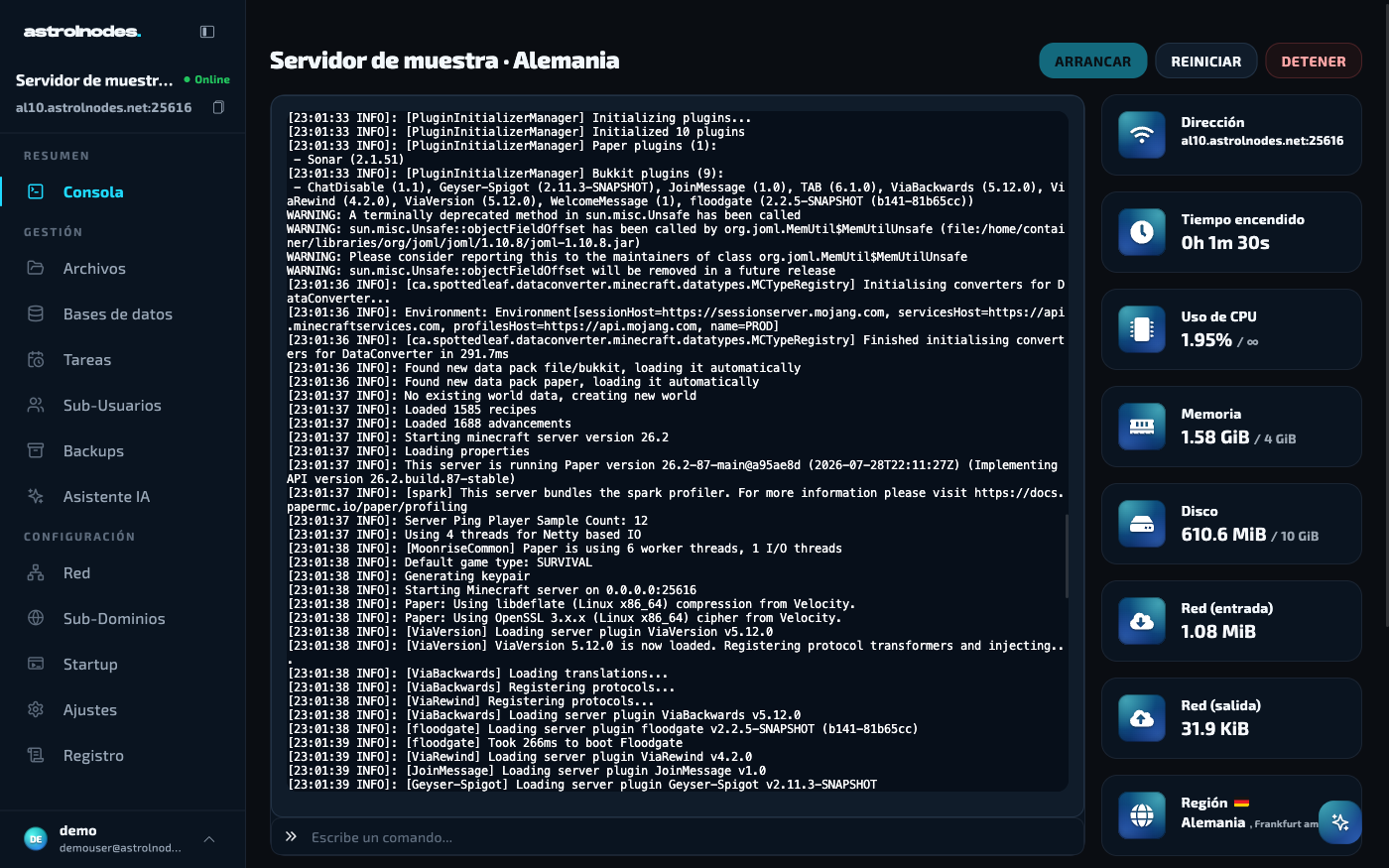
Live console

Live console

The server log in real time and a field to run Rust commands without leaving the browser.

Reviews

Backed by thousands like you

The machine is perfect, fast and smooth. The service and technical support are spectacular. Highly recommendable.
Jota Trustpilot
10/10 hosting that is way too good, really stable (which is what I was looking for) super fluid the owner is always there to help you and make things easy for you, nothing to complain about really.
Luiss Trustpilot
It's one of the most stable servers I've ever tried. In terms of performance it works very well and the support is fast and always helps you with what you need. So far the experience is being very positive, no problems or downtime.
Jelo Trustpilot
Impeccable service. At first we had a problem, but they quickly gave us a solution and a credit for the inconvenience and now it works great. The panel is very comfortable to use and it has already mitigated a couple of DDOS attacks for us. Recommendable 100%
Simmerpass Trustpilot
Incredible prices and incredible host the server works very well and the staff is very attentive and support you manually on the server.
Gradiux Trustpilot
What can you say about a hosting that really cares about its customers 100%. They adapt to any need and offer exceptional support. Their servers literally fly. From a simple Minecraft server to the infrastructure of a large company.
FalconX Trustpilot
Rust hosting

Frequently asked questions

What you usually want to know before setting up your Rust server.

What is a Rust server and what do I need?
It is a dedicated server for your Rust game, online 24/7, that your players connect to. You create it in one click from our panel: no need to install anything on your PC or know about servers.
How much RAM do I need?
6 GB runs a small vanilla map fine. For modded servers or a 4000+ worldsize, go for 12-16 GB. RAM grows through the wipe cycle, so size for the end of the wipe, not day one.
What is a wipe and how often does it happen?
A wipe resets the map (and sometimes blueprints) for a fresh start. Facepunch forces a map wipe on the first Thursday of each month, plus blueprint wipes roughly every other month. You can schedule your own with a fresh seed from the panel.
Can I use Oxide, uMod or Carbon plugins?
Yes. You pick the framework (Vanilla, Oxide/uMod or Carbon) and switch in one click on reinstall. Then upload your .cs plugins over SFTP or via the file manager and they go live.
How many slots can I run?
As many as you want: you set the slots in the startup parameters. To keep things smooth, move up a plan as your community grows, since more players and a bigger map need more RAM and CPU.
Is it protected against DDoS attacks?
Yes, every server ships with always-on anti-DDoS protection at no extra cost. That matters in Rust, where servers get attacked often.
Can I change plan later?
Whenever you like. You upgrade from your client area and the resources (RAM, CPU) are increased without losing your world or your configuration. Downgrades are not available.
Is there a money-back guarantee?
Yes. If the server does not work because of a fault on our side, you have a 7-day money-back guarantee. Reach out via ticket or Discord and we will sort it.
Need help or have questions? Join our community on Discord — 24/7 support, exclusive discounts and news.
Join Discord