SALE

Sale on all game servers · up to −19% · discount already applied, no coupons

Test servers

Try it on our servers

We keep two servers open, one in Germany and one in Miami. Join from Java or Bedrock, on whatever version you run, and see how they perform before paying for anything.

If after the trial you decide it's not for you, you pay nothing. If you keep it, billing starts the next day at the regular price.

The server closes instantly (wrong Java version)

Minecraft servers 1 views Updated 2 Aug 2026

Newer Minecraft versions need a newer Java version. You change it in the Startup tab.

If your server closes instantly or crashes right after starting, a very common cause is that it's using a Java version that doesn't match your Minecraft version.

Roughly:

  • Minecraft 1.17 – 1.20 → Java 17 (or 21).
  • Newer versions (1.21+) → Java 21, and the latest may require Java 25.

How to change the Java version

  1. Open your server in the panel.
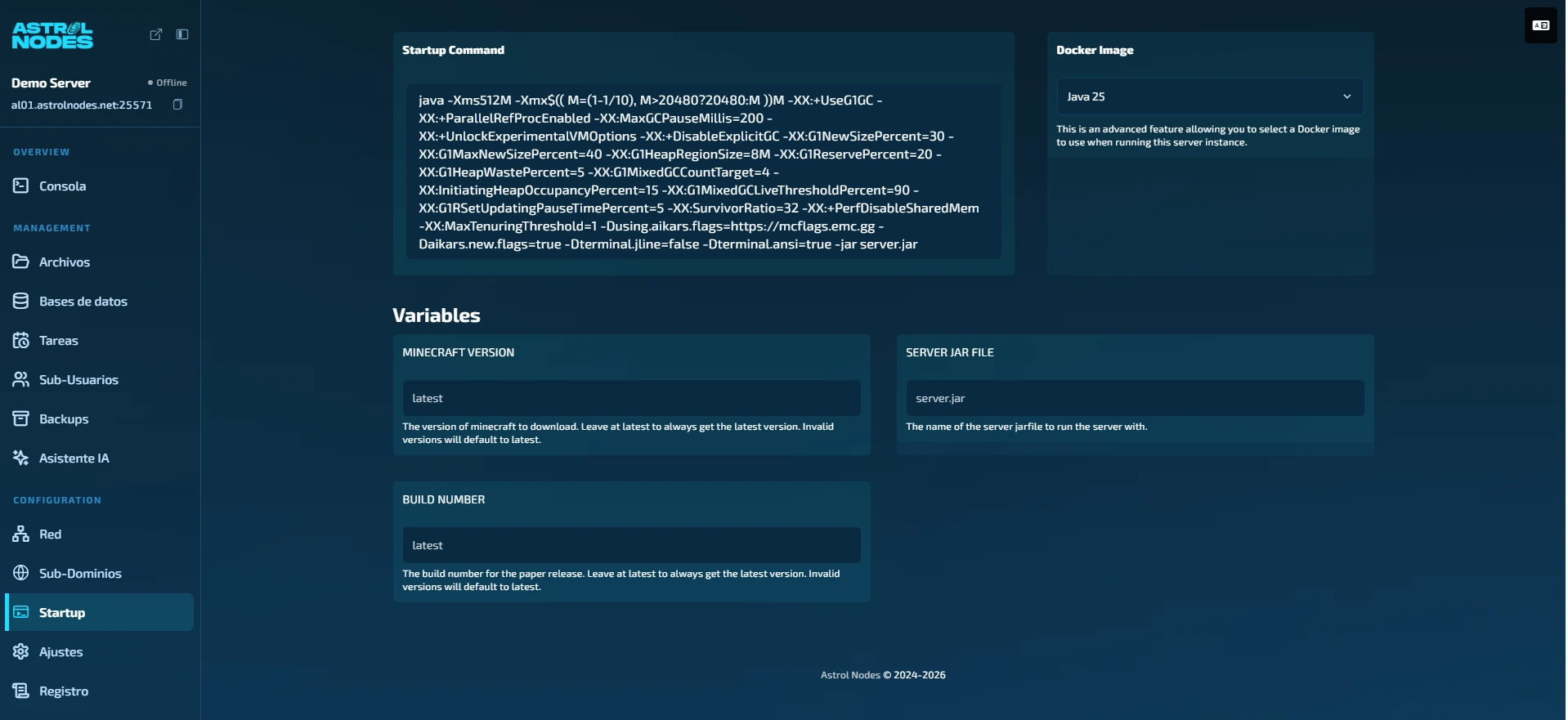
  2. Go to the Startup tab.
  3. In the Docker Image block (top right), open the dropdown and pick the Java version your Minecraft version needs.
  4. Go back to Console and press Start.
gamedash.astrolnodes.net · StartupThe Docker Image dropdown in the Startup tab, where you pick the Java version
The Docker Image dropdown in the Startup tab, where you pick the Java version

Not sure which version you need? Paste the error into Astrol AI in the panel or open a ticket and we'll enable it for you.

Was this article helpful?

Need more help?

Open a ticket and our team will get back to you fast.

Open a ticket